
- Details
- Written by: khalil shreateh
- Category: Social Extensions
- Hits: 136
The human brain is not designed to remember everything. Between meetings, deadlines, personal commitments, and the constant stream of digital information, important tasks inevitably slip through the cracks. The solution is not to improve memory—it is to offload the responsibility of remembering to a system that never forgets. Browser-based reminder extensions serve this exact purpose, providing a lightweight, always-accessible mechanism for capturing tasks and deadlines as they arise.

- Details
- Written by: khalil shreateh
- Category: Social Extensions
- Hits: 185
Repetitive typing is one of the most pervasive productivity drains in modern knowledge work. Customer support agents type the same replies dozens of times per day. Developers paste the same code snippets, API keys, and terminal commands across multiple projects. Writers reuse citations, phrases, and formatting templates. Sales professionals send similar outreach messages to hundreds of prospects. The common thread across all these scenarios is the same: valuable time is wasted on tasks that could be automated with a simple text management system.
Read more: Save and Copy Text — Quick Copy & Save Any Text Snippet from Your Browser
- Details
- Written by: khalil shreateh
- Category: Social Extensions
- Hits: 127
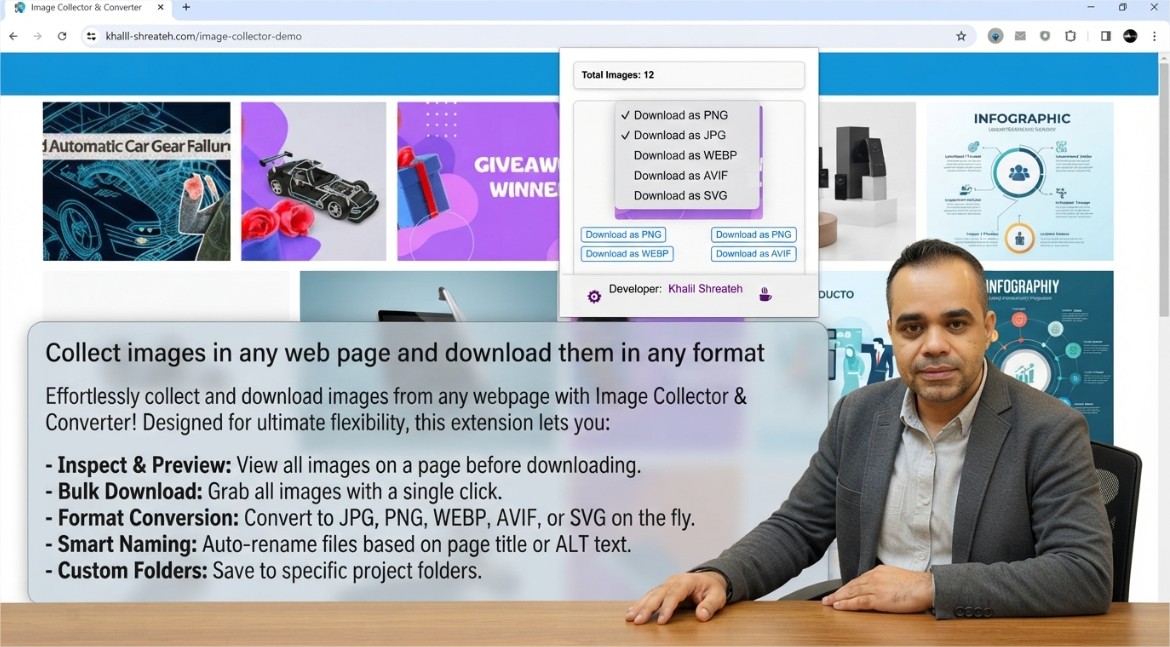
Web pages are composed of numerous media assets, and images constitute a significant portion of that content. Whether used for design inspiration, research documentation, content creation, or data analysis, the ability to efficiently collect images from a webpage is a recurring need for many professionals. The traditional approach—right-clicking each image and selecting "Save image as"—becomes impractical when dealing with pages that contain dozens or hundreds of visual assets.
Read more: Webpage Image Collector – Collect and Download Images from Any Website

- Details
- Written by: khalil shreateh
- Category: Social Extensions
- Hits: 148
HTTP cookies remain one of the most fundamental components of web authentication and session management, yet they are often misunderstood by developers and end users alike. A cookie is a small piece of data that a server sends to a client's browser, which the browser then stores and returns with subsequent requests to the same server. This mechanism enables stateful interactions in an otherwise stateless HTTP protocol—allowing websites to remember login sessions, shopping cart contents, user preferences, and tracking identifiers.
Read more: Cookie Viewer – Inspect and Manage Browser Cookies Easily
- Details
- Written by: khalil shreateh
- Category: Social Extensions
- Hits: 1369
Manage your Twitter presence with ease by utilizing this powerful Chrome extension that enables bulk deletion of past tweets. Streamline your Twitter profile and maintain a curated online persona with this handy tool.
In today's digital age, managing your online presence is crucial. Twitter, a prominent social media platform, serves as a hub for sharing thoughts, engaging with others, and staying informed. However, over time, your Twitter timeline can accumulate a vast collection of tweets, some of which may no longer reflect your current views or align with your professional aspirations.
To address this need, a free Chrome extension has emerged as a valuable tool for Twitter users seeking to declutter their timelines and curate a more polished online presence. This extension empowers users to bulk delete past tweets, enabling them to selectively remove outdated or irrelevant content.
Downloading and Installing the Extension:
-
Download the extension's zip file from the provided link.
-
Extract the contents of the zip file to a convenient location on your computer.
-
Open the Chrome browser and click on the three dots icon in the top right corner.
-
Select "More tools" and then click on "Extensions."
-
Enable Developer mode by toggling the switch in the top right corner.
-
Click on "Load unpacked" and navigate to the extracted folder containing the extension's files.
-
Select the extension folder and click "Open."
The extension will now be installed and ready for use.
Operating the Extension:
-
Access X (Twitter) and log in to your account.
-
Click on the extension icon in the top right corner of the browser window.
-
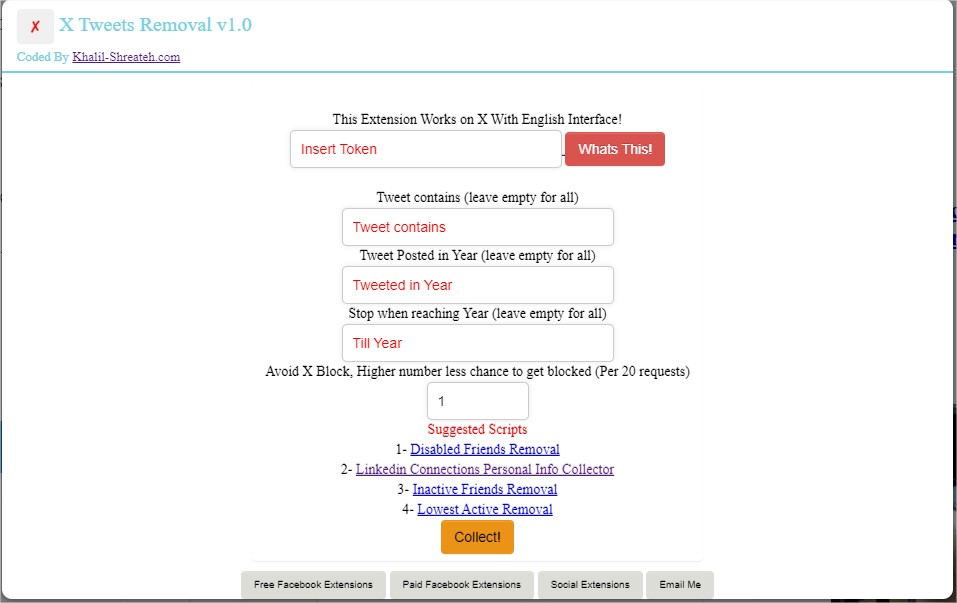
Enter the token generated from your online app. Use this app : https://khalil-shreateh.com/khalil.shtml/social_applications/web-applications/token-generator.html
-
Specify the criteria for tweet deletion:
-
Tweet Text: Enter a specific phrase or keyword. If a tweet contains this text, it will be marked for deletion.
-
Year: Select a specific year. Tweets posted in that year will be marked for deletion.
-
Till Year: Specify an end year. The extension will stop processing tweets once it reaches tweets posted in that year.
- Click on the "Start" button to initiate the bulk deletion process.
The extension will scan through your tweets and identify those matching the specified criteria. It will then proceed to delete the selected tweets.
Additional Notes:
-
The extension respects Twitter's API limits and will delete tweets gradually to avoid exceeding usage restrictions.
-
The extension does not store any personal data or tweet content.
-
The extension is compatible with the latest versions of the Chrome browser.
By utilizing this free Chrome extension, Twitter users can effectively manage their online presence, maintaining a clean and curated timeline that reflects their current persona and professional goals.
Your download is on its way
Just a short wait — or explore while you wait.
🇬🇧 English: https://youtu.be/E8n98WLHBXs
🇸🇦 فيديو عربي: https://youtu.be/2yRuEQsTMx8