Web pages are composed of numerous media assets, and images constitute a significant portion of that content. Whether used for design inspiration, research documentation, content creation, or data analysis, the ability to efficiently collect images from a webpage is a recurring need for many professionals. The traditional approach—right-clicking each image and selecting "Save image as"—becomes impractical when dealing with pages that contain dozens or hundreds of visual assets.
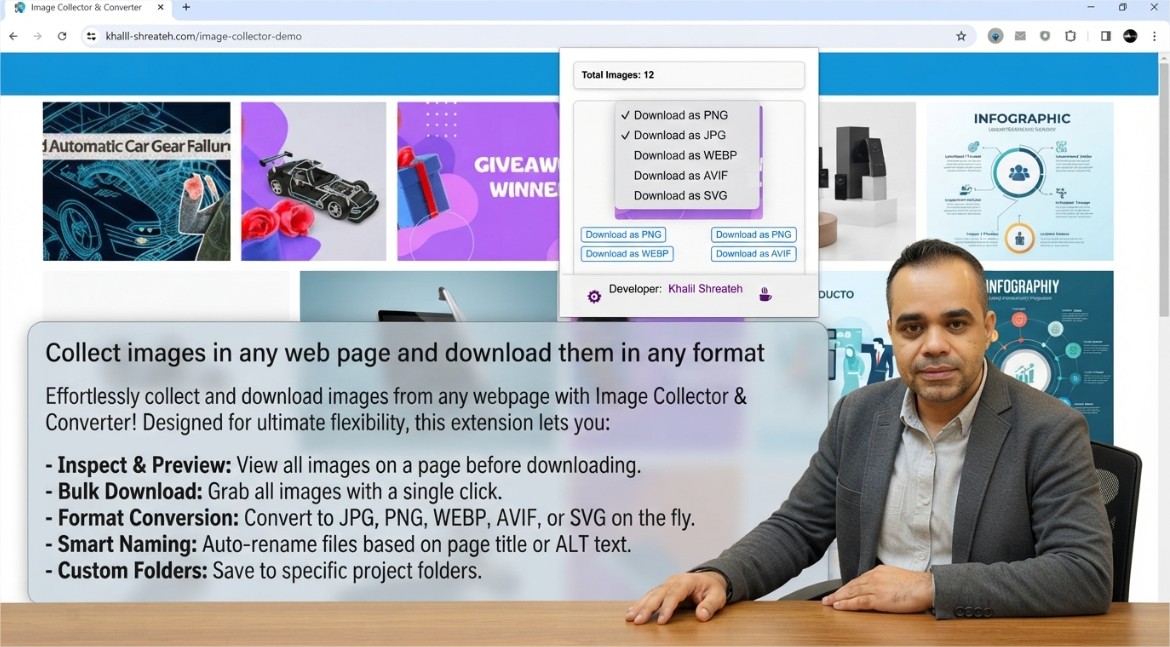
The Webpage Image Collector Chrome extension addresses this friction by providing a streamlined interface that automatically detects, filters, and downloads all images from the active webpage. Rather than manually saving each asset individually, users can collect the complete set of images in a single operation, with the flexibility to filter by size, choose output formats, and download selected images individually or in bulk.
What the Webpage Image Collector Extension Does
The extension scans the Document Object Model (DOM) of the current webpage and identifies all image elements—including standard <img> tags as well as background images defined in CSS. It then presents these images in a clean, organized list within the extension's popup interface. Each image is displayed with a preview thumbnail, its dimensions, and the original file format.
From this interface, users can:
- Filter images by size: Set minimum width and height thresholds to exclude small assets such as icons, spacers, and tracking pixels
- Choose output formats: Download images in PNG, JPG, WebP, or their original format ("Raw") without re-encoding
- Download selectively or in bulk: Select individual images for download or collect the entire set with a single action
- Preview before downloading: View each image in the collection before committing to a download
The extension's filtering capability is particularly valuable when dealing with modern websites that load dozens of small assets—icons, buttons, avatars, and tracking pixels—that are not relevant to the user's collection goal. By setting a minimum size threshold, users can focus exclusively on the substantive images that matter for their project.
Why Image Collection Matters for Professionals
The ability to collect images efficiently has practical applications across multiple domains:
- Web design and UI/UX research: Collecting visual references from competitor websites, design galleries, and inspiration boards accelerates the mood board creation process
- Content creation and blogging: Gathering images for articles, social media posts, and presentations without navigating through multiple file downloads
- Academic and market research: Documenting visual data from websites for analysis, archiving, or citation purposes
- E-commerce and product research: Collecting product images from multiple vendors for comparison, cataloging, or competitive analysis
The extension also addresses a common frustration: websites that disable right-click context menus to prevent image saving. By operating through the browser's extension API rather than the page's JavaScript context, the extension bypasses these client-side restrictions and provides a legitimate method for image collection that does not violate the website's terms of service, as it only accesses resources that are already loaded in the browser.
Technical Implementation and Privacy Considerations
The extension uses the Chrome extension API to access the current tab's DOM and extract image sources. It does not inject scripts into web pages or modify the page's content. All image detection occurs through the extension's background script, which parses the page's HTML structure and CSS to identify image resources.
Importantly, the extension does not collect, store, or transmit any user data externally. All processing occurs locally within the browser instance. The developer has explicitly disclosed that the extension does not collect or use any personal data, does not sell data to third parties, and does not use data for any purpose unrelated to the extension's core functionality. The privacy policy is publicly available and clearly states these commitments.
The extension is built using Manifest V3, the latest version of Chrome's extension platform, which enforces stricter security controls and limits the scope of permissions that extensions can request. This ensures that the extension operates with minimal privileges while still providing its full image collection capabilities.
Customization and Configuration
The extension provides an options page where users can configure default settings that persist across browsing sessions. These settings include:
- Minimum image dimensions: Define the minimum width and height for images to be included in the collection. This filter is applied automatically when the extension scans a page
- Preferred output formats: Select which image formats to collect (PNG, JPG, WebP, or all formats)
- Default download behavior: Configure whether images download in their original format or are converted to a preferred format
These settings can be updated at any time by clicking the gear icon within the extension's popup interface, providing full control over the collection process without requiring users to navigate to a separate settings page.
How to Install and Use Webpage Image Collector
The extension is available for free on the Chrome Web Store. Installation takes only a few seconds:
- Navigate to the Webpage Image Collector listing in the Chrome Web Store
- Click the "Add to Chrome" button
- Confirm the permissions requested by the extension
- Once installed, pin the extension to the toolbar by clicking the puzzle piece icon and selecting the pin icon next to the extension's name
To use the extension, navigate to any webpage containing images and click the extension icon in the toolbar. The extension will scan the page and display the number of images detected. The images appear in a scrollable list, each with a preview thumbnail and action buttons. From there, users can download individual images by clicking the download button beneath each preview, or select multiple images for batch download.
The extension's lightweight footprint—just under 30 KiB—means it has negligible impact on browser performance. It does not run background processes or inject scripts into web pages beyond what is necessary for image detection, further minimizing its resource usage.
The Webpage Image Collector extension represents a focused, practical tool that solves a specific problem: making image collection from web pages fast, efficient, and customizable. Whether you are a designer gathering visual references, a researcher documenting visual data, or a content creator sourcing images for your next project, the extension provides the flexibility and control you need with minimal friction.
Written by Khalil Shreateh Cybersecurity Researcher & Social Media Expert Official Website: khalil-shreateh.com