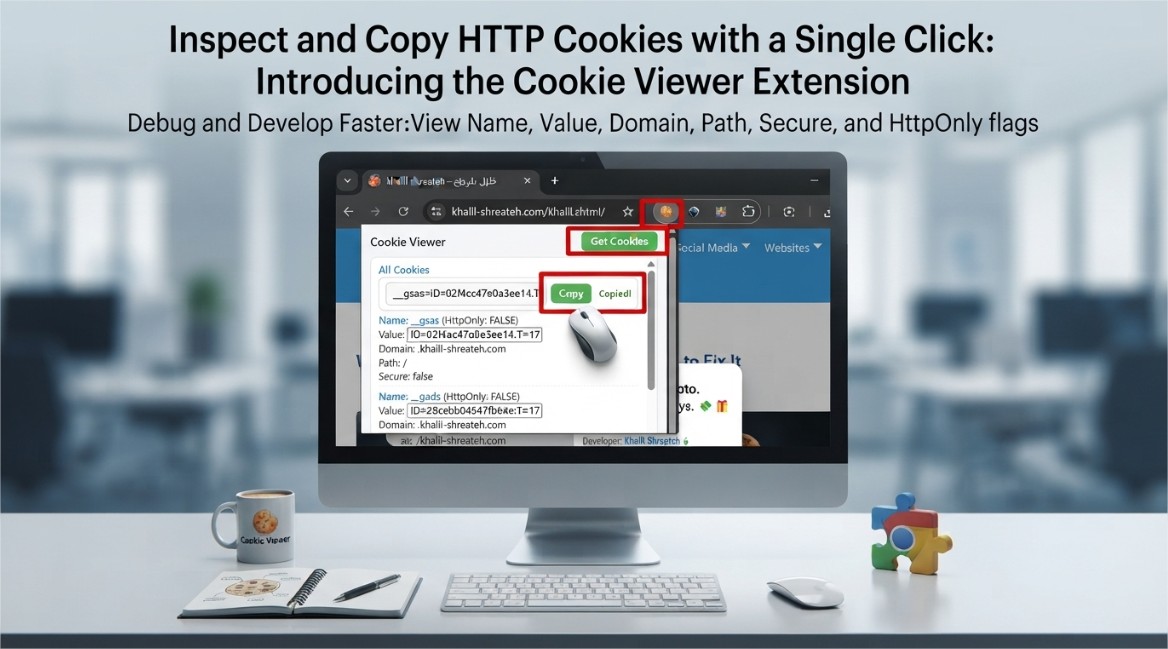
HTTP cookies remain one of the most fundamental components of web authentication and session management, yet they are often misunderstood by developers and end users alike. A cookie is a small piece of data that a server sends to a client's browser, which the browser then stores and returns with subsequent requests to the same server. This mechanism enables stateful interactions in an otherwise stateless HTTP protocol—allowing websites to remember login sessions, shopping cart contents, user preferences, and tracking identifiers.
Despite their ubiquity, inspecting cookies in a browser environment is not always intuitive. The built-in Developer Tools provide cookie inspection capabilities, but they require navigating through multiple panels and refreshing the view manually. The Cookie Viewer Chrome extension addresses this friction by providing a streamlined, one-click interface that fetches and displays all cookies associated with the current website immediately upon activation.
What the Cookie Viewer Extension Does
The extension automatically retrieves cookies for the active tab's domain and presents them in a clean, readable interface. Each cookie is displayed with its full set of attributes:
- Name: The unique identifier for the cookie, used by the server to reference the stored data
- Value: The actual data payload stored in the cookie, which may be a session token, user ID, preference setting, or other application-specific data
- Domain: The host to which the cookie is sent. This determines which subdomains can access the cookie
- Path: The URL path prefix that must match for the cookie to be included in a request
- Secure flag: Indicates whether the cookie should only be transmitted over HTTPS connections
- HttpOnly flag: Prevents client-side scripts from accessing the cookie, mitigating cross-site scripting (XSS) attacks
The extension also provides a copy function, allowing developers to copy individual cookie values or the entire set of cookies for a domain with a single click. This is particularly useful when debugging API authentication flows, replicating session states across different browsers, or analyzing cookie-based tracking mechanisms.
Why Cookie Inspection Matters for Developers
For web developers and security researchers, the ability to inspect cookies quickly is not a convenience—it is a necessity. Consider the following scenarios:
- Authentication debugging: When a login session fails unexpectedly, inspecting the session cookie's value, domain, and path can reveal misconfigurations in the cookie's scope or expiration
- Security auditing: Verifying that sensitive cookies are marked as Secure and HttpOnly is a basic security hygiene check. The extension makes this verification instantaneous
- Third-party integration testing: When integrating with external services that rely on cookies for authentication, being able to copy and paste cookie values across environments accelerates troubleshooting
- Privacy analysis: Understanding what cookies a website sets and what data they contain helps users make informed decisions about their privacy
The extension's automatic fetching behavior eliminates the need to manually locate cookies within the browser's storage panels, reducing the cognitive overhead of debugging and allowing developers to focus on the actual problem at hand.
Technical Implementation and Privacy Considerations
The extension operates entirely within the browser's extension API framework, using the chrome.cookies API to retrieve cookie data for the current tab. This API requires the cookies permission to be declared in the extension's manifest, which informs the user during installation that the extension will have access to cookie data.
Importantly, the extension does not transmit, store, or share any cookie data externally. All processing occurs locally within the browser instance. The developer has explicitly disclosed that the extension does not collect or use any user data, and it does not sell or transfer data to third parties for any purpose unrelated to the product's core functionality.
The extension is built using Manifest V3, the latest version of Chrome's extension platform, which enforces stricter security controls and limits the scope of permissions that extensions can request. This ensures that the extension operates with minimal privileges while still providing its core functionality.
Use Cases Beyond Development
While the extension is primarily designed for developers, it also serves practical purposes for power users and privacy-conscious individuals:
- Cross-browser session migration: Copying cookies from one browser to another can transfer active sessions without requiring re-authentication
- Testing different user states: By copying cookies from a logged-in session, testers can quickly simulate authenticated states in separate browser instances
- Understanding website behavior: Seeing exactly what data a website stores about your session provides transparency into the site's data practices
How to Install and Use Cookie Viewer
The extension is available for free on the Chrome Web Store. Installation takes seconds:
- Navigate to the Cookie Viewer listing in the Chrome Web Store
- Click the "Add to Chrome" button
- Confirm the permissions requested by the extension
- Once installed, the extension icon appears in the browser toolbar
To use the extension, navigate to any website and click the extension icon. The popup will automatically display all cookies set by that domain, organized in a sortable table. Individual cookie values can be copied by clicking the copy button next to each entry, or the entire cookie list can be copied with a single action.
The extension's lightweight footprint—just over 21 KiB—means it has negligible impact on browser performance. It does not run background processes or inject scripts into web pages, further minimizing its resource usage.
The Cookie Viewer extension represents a focused, purpose-built tool that solves a specific problem: making cookie inspection fast, accessible, and hassle-free. Whether you are a developer debugging authentication flows, a security researcher auditing cookie security flags, or a power user curious about what data websites store about you, the extension provides the visibility you need with minimal friction.
Written by Khalil Shreateh Cybersecurity Researcher & Social Media Expert Official Website: khalil-shreateh.com