The average professional inbox contains messages from dozens—sometimes hundreds—of distinct senders. Recognizing who each email is from at a glance is essential for efficient triage, yet the default avatar system in Outlook on the web provides limited visual differentiation. Most senders are represented by generic initials or low-resolution profile pictures that offer little more than a letter to distinguish one contact from another.
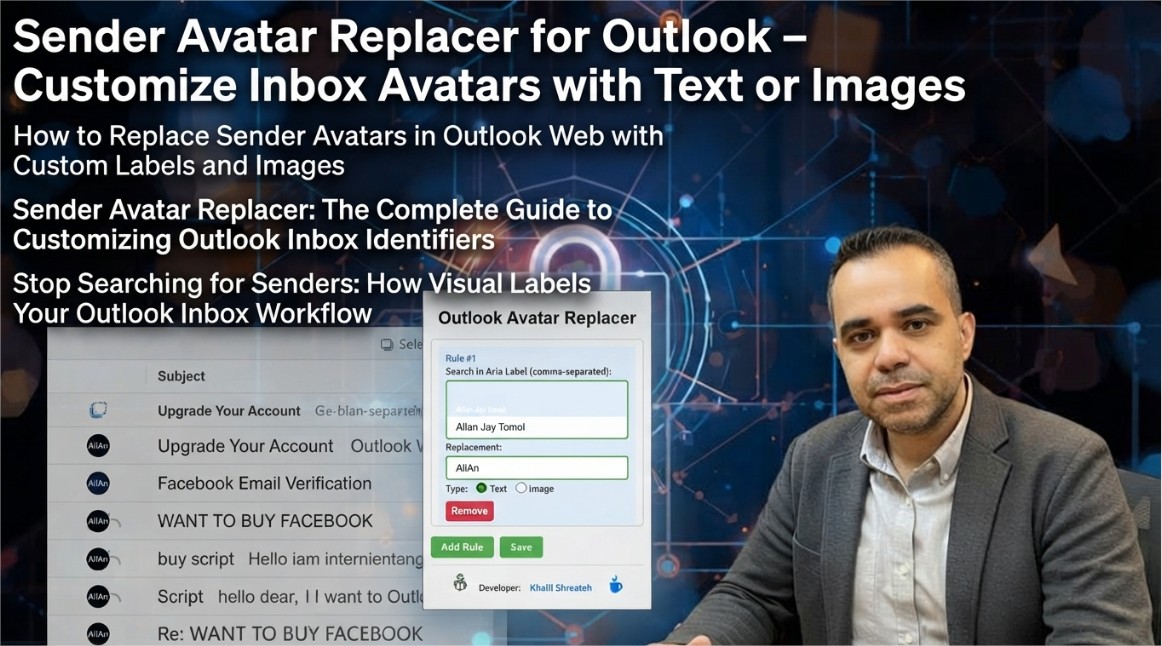
The Sender Avatar Replacer Chrome extension addresses this limitation by giving users full control over how sender avatars appear in their Outlook inbox. Rather than relying on Outlook's default avatar generation, users can replace any sender's avatar with custom text labels or uploaded images—transforming the inbox into a visually organized workspace where important contacts are immediately recognizable.
What the Sender Avatar Replacer Extension Does
The extension is designed specifically for Microsoft Outlook on the web and allows users to customize sender avatar labels with their own text or images.[reference:1] This replaces the generic initials or profile pictures that Outlook typically displays with meaningful identifiers that help users quickly recognize important senders.[reference:2]
The core functionality includes:
- Text-based labels: Assign custom text to any sender—such as "Team Lead," "Client A," or "Urgent"—that appears prominently in place of the default avatar
- Image uploads: Replace default avatars with custom images, enabling visual recognition through logos, team photos, or any other visual identifier
- Persistent customization: All changes are saved locally and persist across browsing sessions, ensuring that the inbox remains consistently organized
- Selective application: Users can customize individual senders without affecting others, allowing for a tailored inbox experience
Why Custom Sender Avatars Matter
The human brain processes visual information significantly faster than text. When scanning an inbox, the ability to recognize a sender by a custom avatar—rather than reading and processing a name—reduces cognitive load and accelerates decision-making. This is particularly valuable for professionals who manage high volumes of email from recurring contacts.
Consider the following scenarios where custom sender avatars provide tangible productivity benefits:
- Client management: Assign distinct visual identifiers to different clients, enabling immediate recognition of client communications without reading sender names
- Team communication: Use team logos or department colors to quickly identify internal communications versus external messages
- Priority filtering: Mark high-priority senders with distinctive visual cues—such as a red label or a star image—that signal urgency at a glance
- Role identification: Differentiate between senders based on their role (manager, direct report, vendor) through visual labels that eliminate the need to remember job titles
The extension's approach is deliberately simple and focused. It does not attempt to replace Outlook's full contact management system or introduce complex automation. Instead, it provides a single, well-defined capability: giving users control over the visual representation of senders in their inbox.
Technical Implementation and Privacy Considerations
The extension operates by intercepting and modifying the avatar elements rendered by Outlook's web interface. It identifies sender-specific elements in the DOM and replaces the default avatar content with the user's custom text or image. All customization data is stored locally within the browser's storage—no data is transmitted to external servers.
The developer has explicitly disclosed that this product does not collect or use any user data, does not sell data to third parties, and does not use or transfer data for any purpose unrelated to the product's core functionality.[reference:3] The privacy policy is publicly available and clearly states these commitments.[reference:4]
The extension is built using Manifest V3, the latest version of Chrome's extension platform, which enforces stricter security controls and limits the scope of permissions that extensions can request. This ensures that the extension operates with minimal privileges while still providing its full avatar customization capabilities.
How to Install and Use Sender Avatar Replacer
The extension is available for free on the Chrome Web Store. Installation takes only a few seconds:
- Navigate to the Sender Avatar Replacer listing in the Chrome Web Store
- Click the "Add to Chrome" button
- Confirm the permissions requested by the extension
- Once installed, navigate to Outlook on the web and open your inbox
To customize a sender's avatar, locate any email from that sender in your inbox. Click the extension icon in the toolbar, and follow the prompts to assign a custom text label or upload an image. The changes apply immediately and persist across all messages from that sender.
The extension's footprint—approximately 201 KiB—ensures minimal impact on browser performance. It does not run background processes beyond what is necessary for avatar replacement, maintaining responsiveness and efficiency.
The Sender Avatar Replacer extension represents a focused, practical tool that solves a specific problem: making sender recognition in Outlook faster and more intuitive through visual customization. Whether you are a professional managing a high-volume inbox, a team leader coordinating with multiple groups, or simply someone who prefers a visually organized workspace, the extension provides the customization you need with complete privacy and minimal friction.
Written by Khalil Shreateh Cybersecurity Researcher & Social Media Expert Official Website: khalil-shreateh.com